FAI Ballooning Software
Watch the drawing
balloon itself.
Every dimension, every GD&T callout, every tolerance - found, numbered, and written into your Form 3. You just walk through it and nod.
First drawing free · no setup · 2D PDF in, Form 3 out.
A real drawing, ballooned in seconds - then reviewed section by section.
The quiet cost
You became an inspector to judge parts.
Not to trace circles for three hours.
Every FAIR begins the same way: a drawing, a highlighter, and an evening you will not get back. Number every feature. Re-type every dimension. Chase the tolerance no one printed. And the whole time, the quiet dread - did I miss one? - because it is your name on the report.
Mavlon does that part. All of it. In the time it takes to pour a coffee. Then it hands the drawing back to you - already ballooned, already in the form - and asks you to do the one thing software never could: use your judgment.
The whole review, in one place
Nothing hidden. Everything checkable.
The ballooned drawing on one side, your Form 3 on the other - always in sync. Hover a row, its balloon lights up. Drag a balloon, the row follows. It is all on the table, in front of you. You are simply the final eye.
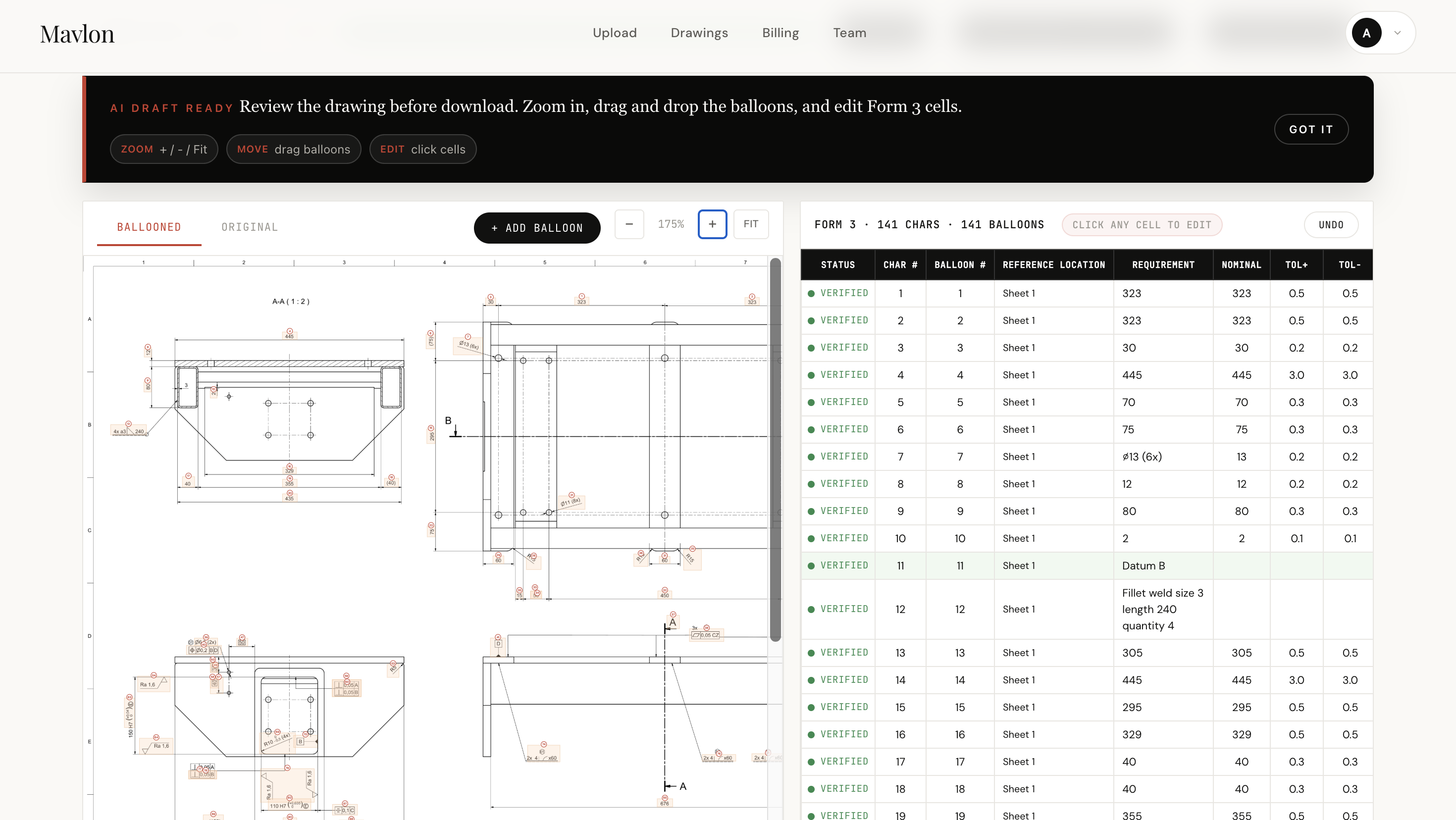
Ballooned drawing · live Form 3 · every characteristic, one tap to verify
Drawing to signed Form 3,
without the evening.
Four steps. The first three take a minute. The last one is the part only you can do.
The things you would have missed at 11pm.
Not just the obvious dimensions. The requirements that hide in notes, on back views, and across sheets - the ones that fail an audit.
The long version
What ballooning a drawing really is - and why it eats your evenings.
Before a single part ships, somebody has to prove the first one was made right. That proof is a First Article Inspection, and it begins by ballooning the drawing: walking every view, circling each dimension, tolerance, note, and GD&T callout, and numbering it as a characteristic on an AS9102 Form 3.
On a clean three-view part, that is twenty minutes. On a seven-sheet aerospace bracket with general notes, datum schemes, and a title block full of blanket requirements, it is an afternoon - and a nervous one, because a single missed characteristic is a finding waiting to happen, and it is your name on the report.
Why ballooning has stayed manual for so long
Traditional auto-ballooning software runs optical character recognition over the page. OCR is good at exactly one thing: finding text. But a drawing is not text. A position callout is a feature control frame with a symbol, a tolerance value, and one to three datum references that only mean anything together. A general note like ISO 2768-m silently governs every untoleranced dimension on the sheet. A 2X in front of a hole quietly doubles the count. OCR sees characters; it does not see meaning - so it lands around 85 to 90 percent and hands you the other ten to fix by hand, which is precisely the slow, error-prone part you wanted gone.
Reading the drawing, not scraping it
Interactive auto-ballooning takes a different path. Mavlon reads the drawing the way a senior inspector does. It understands that a dimension belongs to a feature, that a feature control frame carries datums, that a note in the corner sets a blanket tolerance, and that the same hole appearing on three sheets is one characteristic, not three. It places every balloon, writes every row of the Form 3, and applies the general-note tolerances - ISO 2768, decimal-place schemes, ISO 286 fit classes - to the dimensions that never printed their own. The output is not a 90 percent draft to repair. It is a verified characteristic list to review.
Why “interactive” is the word that matters
Software that quietly fills a form and asks you to trust it is the wrong shape for inspection. Your signature is on the FAIR; you are accountable for every characteristic, to your customer and to the auditor. So Mavlon does the reading and the typing, then hands the drawing back and walks you through it one small region at a time - to approve what is right and correct what is not. You are never auditing a black box, and you are never starting from a blank page. The grunt work is gone. The judgment stays yours.
Who interactive auto-ballooning is for
Quality engineers and FAI specialists at aerospace, defense, medical, and precision-machining subcontractors - anyone who receives 2D PDF drawings and owes a customer an AS9102 package. If you have ever ballooned a Boeing or Airbus print by hand late at night, or rebuilt a Form 3 because one tolerance was read off the wrong note, this was built for the work you actually do. See why OCR and AI are not the same job →
7-sheet bracket
typical drawing
line by line
to ballooning
Bring your hardest drawing.
The dense one. The 7-sheet bracket. The scan that has been sitting in your inbox. Watch it balloon itself.
First one is free. No card, no setup.